
Introduction
In today’s digital age, securing sensitive documents is important. Microsoft has introduced a new feature for SharePoint and OneDrive users that allows them to add protection to their PDF files, ensuring unauthorized access is restricted. This feature, associated with Microsoft 365 Roadmap ID 482193, enables users to set an open password or an owner password, enhancing the security of their documents.
Rollout Timeline
- Targeted Release: Mid-May 2025 to late May 2025
- General Availability (Worldwide, GCC, GCC High, DoD): Late May 2025 to early June 2025 (previously late March)
How to Set Up an Open Password
- Open a PDF: Access a PDF saved in your OneDrive or SharePoint document library.
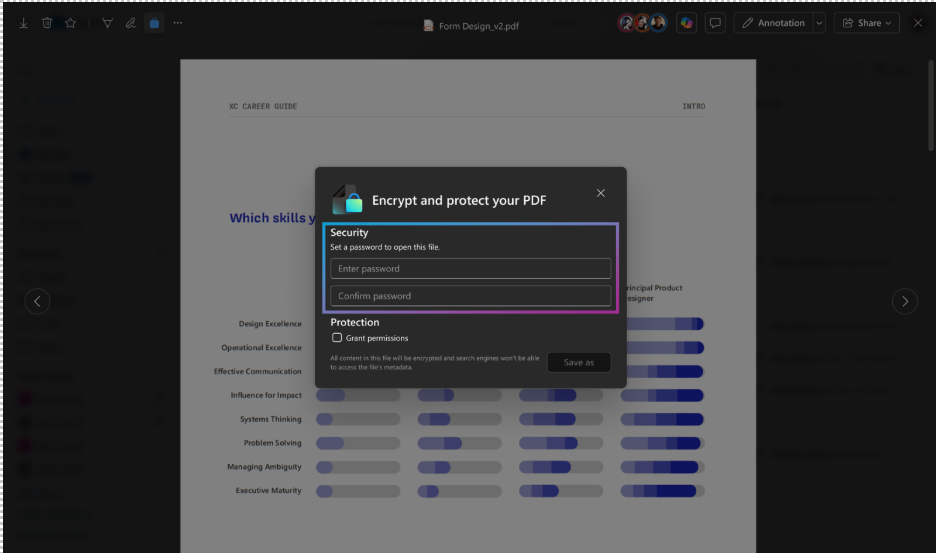
- Click the Lock Icon: Located at the top left of the screen.
- Enter Matching Passwords: Under the Security section.
- Save the Document: Click “Save as” to password protect the document.
- Choose Location: Select where you want to save the file and click “Save here”.
- Notification: A message will appear at the bottom of the screen confirming the new file has been saved successfully.
How to Set Up an Owner Password
- Open a PDF: Access a PDF saved in your OneDrive or SharePoint document library.
- Click the Lock Icon: Located at the top left of the screen.
- Grant Permissions: Under the Protection section, check the “Grant permissions” box.
- Set Permissions: Check the boxes for the permissions you want to allow on the document.
- Enter Matching Owner Passwords: Type the passwords and click “Save as” to set permissions.
- Choose Location: Select where you want to save the file and click “Save here”.
- Notification: A message will appear at the bottom of the screen confirming the new file has been saved successfully.
Preparing for the Rollout
This rollout will happen automatically by the specified date with no admin action required. However, it is advisable to notify your users about this change and update any relevant documentation to ensure a smooth transition.
Conclusion
The new PDF protection feature in SharePoint and OneDrive is a significant step towards enhancing document security. By allowing users to set open and owner passwords, Microsoft ensures that sensitive information remains secure and accessible only to authorized individuals. Stay informed and make the most of this new feature to protect your valuable documents.